


Act! stands out as a leading GoldMine CRM alternative for small and midsize businesses that want contact management, opportunity tracking, follow-up reminders, marketing automation, onboarding support, and customer history in one relationship management platform.
Salesforce is better suited for larger teams that need deep customization. Zoho CRM is useful for budget-conscious teams that want a broad feature set. HubSpot CRM is a good fit for marketing-first teams. Microsoft Dynamics 365 works best for Microsoft-centric organizations with more complex CRM or business process needs.
Still running your sales day out of a CRM that feels stuck in the past? If you’re searching for GoldMine CRM alternatives, chances are you’re tired of clunky workflows, limited automation, or integrations that don’t match how your team actually sells.
The challenge isn’t finding options—it’s choosing a platform that helps you stay organized, follow up faster, and keep customer history in one place without paying for features you don’t need. This guide starts with a practical filter: what matters most to your daily workflow, followed by a quick comparison to narrow your shortlist to 1–2 tools worth testing.
From there, we break down the top alternatives, compare features and pricing, and highlight what actually matters based on how teams use these tools.
Best GoldMine CRM Alternative for SMBs
For small and midsize businesses that feel limited by GoldMine CRM’s dated interface, manual workflows, or lack of automation, Act! is a strong alternative.
Act! combines CRM and marketing automation in one platform, helping teams manage contacts, track opportunities, schedule follow-ups, run email campaigns, and maintain complete customer history.
GoldMine may still work for simple, legacy contact management, but businesses that need stronger usability, integrated marketing, onboarding support, and modern relationship management should consider Act! and other current CRM alternatives.
Overview of GoldMine CRM Alternatives
When evaluating GoldMine CRM alternatives, focus on what your team needs day to day—clear customer history, efficient follow-ups, and simple deal tracking. This guide highlights five popular SMB options, including Act!, which combines CRM and marketing automation without enterprise complexity.
Unlike HubSpot, which often requires upgrades for core features, or Zoho, which can require more setup and configuration, Act! provides a more streamlined, SMB-focused solution.
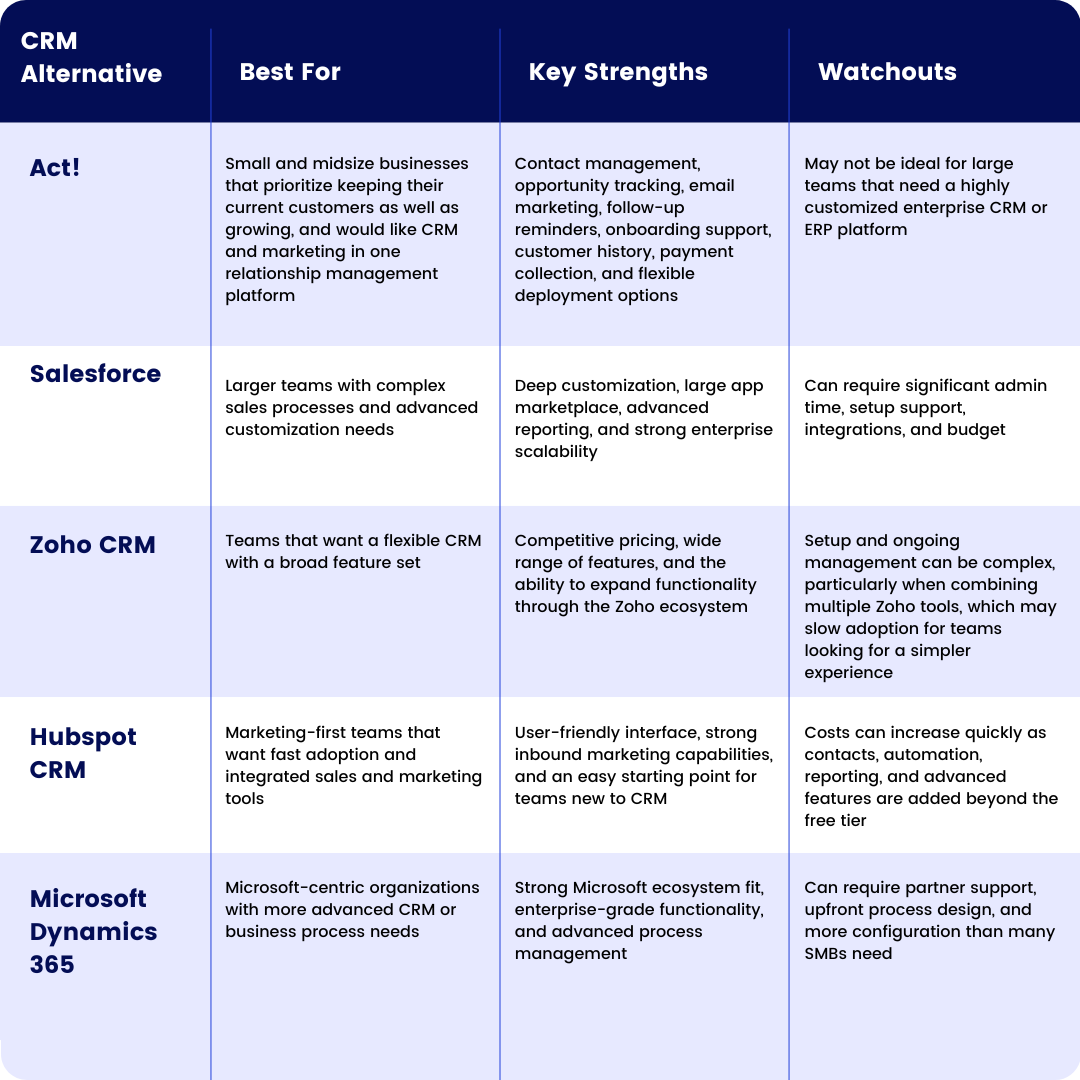
Quick comparison of the Top GoldMine CRM Alternatives
Use this as a starting point to narrow your shortlist to 1–2 tools that align with your actual workflow.
- Act!: Combines CRM, email marketing, and customer management with free onboarding and a Dedicated Account Manager. Offers both cloud and on-premises deployment for flexibility. For more detail, see our Act! vs Goldmine cost and value comparison.
- Salesforce: Highly customizable for complex organizations, but often requires significant admin time, setup, and integrations.
- Zoho CRM: A budget-conscious option with a broad feature set, but often requires more setup and ongoing management—especially when using multiple Zoho apps together. For a side-by-side analysis, see our Act! vs Zoho CRM cost and value comparison.
- HubSpot CRM: Strong for marketing-led teams with an easy setup, but costs can increase quickly as contacts, automation, and advanced features scale. For more detail, see our Act! vs HubSpot cost and value comparison.
- Microsoft Dynamics 365: Best for Microsoft-centric organizations with more advanced needs, but often requires partner support and upfront configuration. Check out this Act! vs Microsoft Dynamics 365 cost and value comparison for more information.
What Should You Consider Before Choosing a GoldMine CRM Alternative?
A common misconception is that more features lead to better outcomes. For SMBs, consistency matters most—choose a tool your team will actually use for calls, tasks, and follow-ups.
As you evaluate options, consider:
- Ease of adoption (can your team log notes and next steps efficiently without unnecessary clicks?)
- Marketing automation (integrated emails, forms, and workflows to nurture leads effectively)
- Support (accessible assistance during data migration or pipeline setup)
Next, we’ll explore deeper into each alternative, helping you align features and pricing with your specific sales process needs. For further insights on how Act! stands apart from other solutions, explore our detailed guide on Act! CRM features and marketing automation.
GoldMine CRM Alternatives Compared
What Features Should You Look for in a GoldMine CRM Alternative?
Focus on features your team will actually use, those that improve follow-ups, centralize customer history, and connect your CRM with marketing tools.
Which GoldMine CRM Alternatives Offer Better Automation?
Basic tools often limit automation to reminders and simple emails. That may work early on, but it falls short when managing consistent follow-ups for leads, renewals, or referrals.
Act! CRM and Act! Marketing enables automated workflows and personalized campaigns, helping teams nurture leads more effectively while saving time.
Which CRM Alternatives Offer the Best Onboarding and Supprt?
Many platforms rely on help docs and forums, which can slow adoption. Act! provides free onboarding with every subscription and access to a Dedicated Account Manager, helping teams get set up and aligned faster.
Which GoldMine CRM Alternatives Have the Best Integrations?
Disconnected tools can lead to lost context and missed follow-ups. Look for a CRM that centralizes email, calendar, and activity tracking in one place.
Act! integrates seamlessly—including Outlook—so teams can manage customer history and take action without switching between systems.
How Customizable Should Your GoldMine CRM Alternative Be?
Some CRMs enforce rigid workflows, while others adapt to how your team actually sells. When comparing options, ask:
- Can you customize fields, stages, and dashboards?
- Does automation reflect your real follow-up process?
- Will support help you set up, or send you to documentation?
Choose a CRM that supports your daily workflow—not one that forces you to change it.
What Do Users Like and Dislike About GoldMine CRM Alternatives?
When assessing CRM tools, the real insights come from daily tasks such as logging emails, accessing customer histories, and planning follow-ups. SMB teams share common objectives: maintaining organization, timely follow-ups, and building enduring customer relations. User feedback commonly reveals key themes.
What Pain Points Push Teams Away from GoldMine CRM Alternatives?
Users rarely complain about missing features, they struggle with operational friction. When simple tasks require too many steps, adoption suffers.
Common pain points include:
- Manual data entry that takes time away from selling
- Lost context when data is spread across multiple tools
- Disorganized follow-ups due to unclear reminders or pipelines
- Limited onboarding and support, leaving teams to figure things out on their own
What Does a Better CRM Experience Look Like?
Satisfied users focus on outcomes, not features—being able to quickly view customer history, stay on top of follow-ups, and keep everything in one place.
Solutions like Act! combine CRM and marketing automation with onboarding support and a Dedicated Account Manager, helping teams stay organized and build stronger relationships over time.
How Should You Evaluate CRM Reviews Before Switching?
Before choosing a CRM, focus on what matters most:
- What problem did the CRM solve (follow-ups, visibility, retention)?
- Does feedback mention onboarding and support—not just features?
- Can you test key workflows like adding contacts, logging emails, and setting next steps?
Understanding which pain points matter most to your team will help you choose the right solution.
What Improves the Adoption of GoldMine CRM Alternatives?
Many teams invest in CRMs to improve productivity, but adoption often falls short when systems are too complex or disconnected from daily workflows. Focus on tools that support how your team actually works day to day.
Prioritize three key areas: usability, automation, and integrations. These aren’t just nice-to-have features—they directly impact whether your CRM gets used consistently.
1: Simpler CRM Interfaces Teams Will Actually Use
SMB teams don’t have time for complex workflows. Look for a CRM that makes it easy to log activity, update opportunities, and manage follow-ups in one place.
Practical check: Can a new user complete a contact update in under two minutes? If not, adoption may suffer.
2: Automation That Improves Follow-Up Without Feeling Robotic
Automation is most effective when it supports real workflows, not when it adds unnecessary layers. Focus on simple, practical use cases like follow-up reminders, task queues, and triggered email sequences based on customer activity.
- Start small with one follow-up sequence for new leads
- Keep it personal by tailoring messages based on real interactions
3: Integrations That Reduce Manual Data Entry
Many teams struggle with customer data spread across email, calendars, and other tools. A modern CRM should centralize this information so you can see the full customer history without switching between platforms.
Look for integrations that automatically capture activity and reduce manual logging—this saves time and helps ensure no follow-up falls through the cracks.
Which Industries Benefit Most From GoldMine CRM Alternatives?
If GoldMine feels outdated or difficult to maintain, you’re not alone. Industries that rely on frequent follow-ups, detailed customer histories, and quick access—like insurance, financial services, and B2B distribution—often outgrow it first.
A modern CRM helps streamline workflows, centralize customer data, and ensure no opportunity is missed. Mobile access is also critical for teams that need to stay updated on the go.
Professional Services: Consultants, Agencies, and Brokers
For relationship-driven businesses, having a clear timeline of calls, emails, notes, and next steps is essential. Many teams also benefit from built-in marketing automation to re-engage past clients without manual tracking.
Field Sales and Service Teams
Teams that are frequently on the move need fast access to customer data, task creation, and follow-up reminders. A mobile-friendly CRM helps capture details immediately and keeps everyone aligned.
Relationship-Driven SMBs with Repeat Business
Businesses that depend on repeat interactions need a complete view of every customer touchpoint, along with reminders for renewals, check-ins, and referrals.
What Should Industry-Specific Teams Look For in a CRM Alternative?
Focus on features that support daily workflows:
- Easy tracking of calls, meetings, and email history
- Clear sales pipeline with defined next steps
- Marketing automation for follow-ups and campaigns
- Reliable onboarding and support
Once you understand your workflow and industry needs, it becomes much easier to choose a CRM that fits how your team actually works.
How Does Customer Feedback Shape Better CRM Alternatives?
When comparing CRM alternatives, look beyond feature lists and ask: how does the product evolve based on customer feedback? This signals whether a CRM will continue improving for SMBs or become overly complex over time.
What Should Customer Feedback Improve in a CRM?
Customer feedback should improve how the CRM performs in daily workflows—logging interactions, accessing customer history, and managing follow-ups.
- Look for updates that align with real tasks, such as:
- Consistent follow-up tools (tasks, reminders, notifications)
- Sales pipelines that reflect your actual process
- Clear, organized customer history with notes and email tracking
- Email marketing tools that support segmentation and personalization
How Can You Tell Whether a CRM Vendor Acts on Feedback?
Not all feedback carries the same weight. Reviews can be ambiguous, and roadmaps may resemble wish lists. A more effective strategy is to evaluate whether the vendor implements clear improvements, offers better onboarding, and provides customer support that ensures you can utilize features effectively.
- Scan release notes for recurring themes (reporting, mobile access, Outlook integrations).
- Inquire about onboarding and who assists you in setting up fields, pipelines, and automation.
- Test a real scenario: capture a web lead, assign follow-up tasks, send a targeted email, and track the opportunity.
Why Act! Feedback and Support Matter for SMBs
Act! is designed to help SMBs stay organized, close more deals, and build stronger customer relationships, not just add more features.
Unlike tools that leave teams to figure things out on their own, Act! includes free onboarding and a Dedicated Account Manager to help you implement improvements and get value faster.
For more on building stronger customer relationships, explore our guide on leveraging customer feedback loops.
How Should You Choose the Right GoldMine CRM Alternative?
Start With Your Day-to-Day Sales and Follow-Up Workflow
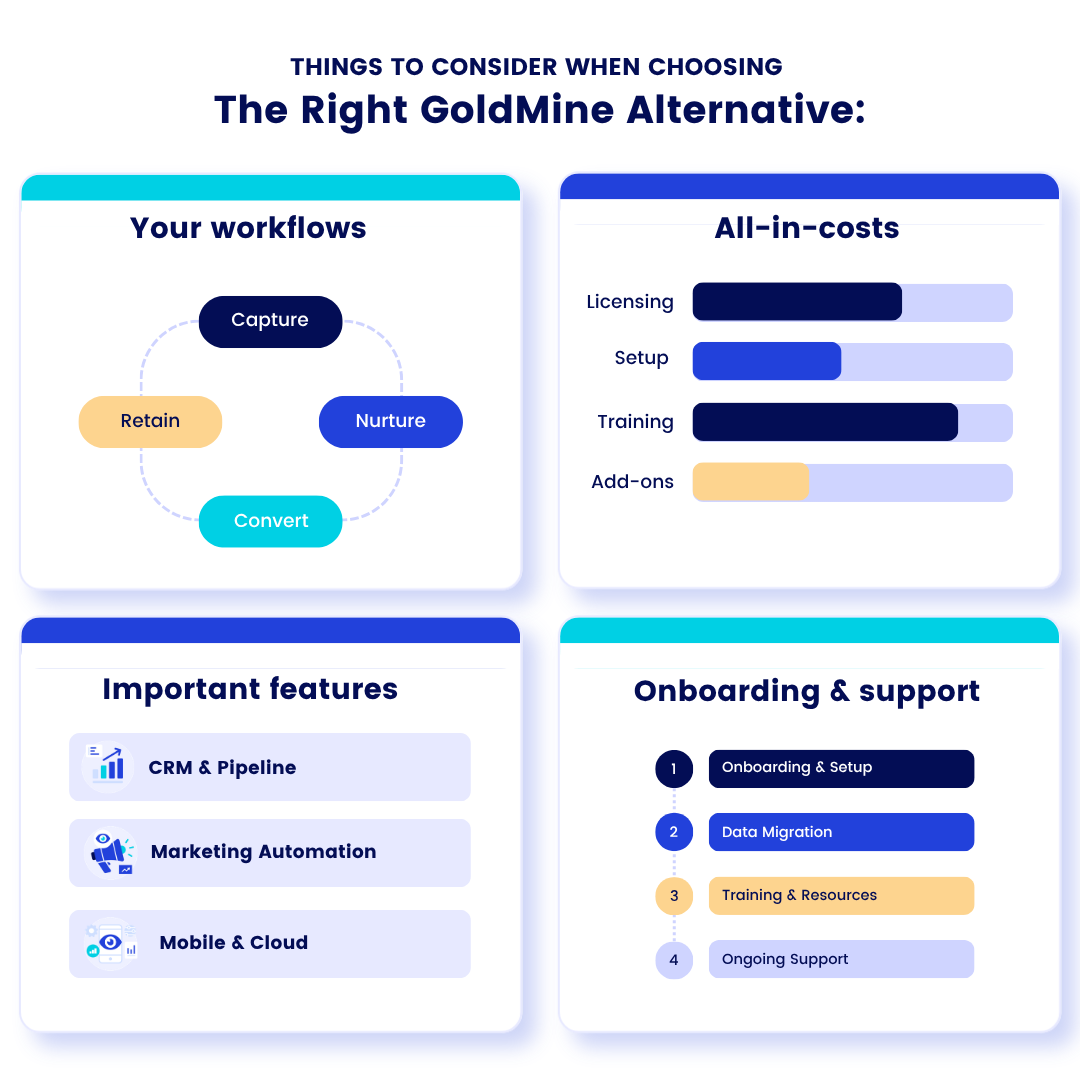
A CRM should simplify your workflow—not add complexity. Start by mapping your weekly tasks (follow-ups, quotes, renewals, support calls) and choose a platform that centralizes customer history, emails, tasks, and opportunities in one place.
Also consider how well the CRM supports daily activity—helping your team stay organized, follow up consistently, and personalize customer interactions.
Don’t Ignore Total Cost
The starting price is rarely the full picture. Some CRMs increase costs as your contact database grows or require add-ons for automation, reporting, and support.
Evaluate what you’ll need 6–12 months from now, not just the entry-level plan.
Look for Practical CRM and Marketing Automation Features
Focus on features that support daily productivity:
- Opportunity tracking with a clear sales pipeline
- Automated reminders, call lists, and notifications for consistent follow-ups
- Email marketing tools to streamline outreach to prospects and customers
Don’t Ignore Onboarding and Support
Successful implementation depends on more than features. Look for strong onboarding and ongoing support, such as access to a Dedicated Account Manager.
Evaluate total cost based on your long-term needs including users, integrations, and add-ons, not just the starting price. A clear budget will help you choose the right deployment model and avoid unexpected costs.
Best-Fit Recommendations for GoldMine CRM Alternatives
- Choose Act! if you’re an SMB that wants CRM and marketing automation in one platform, with built-in support, follow-up tools, and customer history. Compared to HubSpot’s scaling costs and Zoho’s more complex setup, Act! offers a more streamlined, SMB-focused solution.
- Choose Salesforce if you need deep customization, advanced reporting, and have the resources to manage a more complex system.
- Choose Zoho CRM if you want a flexible, platform and are comfortable investing time and add-on fees in setup and ongoing management.
- Choose HubSpot CRM if your team prioritizes inbound marketing and fast adoption, but expect costs to increase as your contact database and feature needs grow.
- Choose Microsoft Dynamics 365 if you’re already in the Microsoft ecosystem and need more advanced CRM or business process functionality.
How We Evaluated These GoldMine CRM Alternatives
We evaluated GoldMine CRM alternatives based on the needs of small and midsize businesses that want to improve customer relationship management without adding unnecessary complexity.
The main criteria included:
- Ease of use and daily adoption
- Contact and customer history management
- Sales pipeline tracking
- Follow-up reminders, tasks, and call lists
- Marketing automation and email campaign support
- Email, calendar, Outlook, and accounting integrations
- Mobile access for sales and service teams
- Onboarding, training, and customer support
- Deployment flexibility, including cloud and on-premises options
- Total cost of ownership, including add-ons and implementation
TL;DR: Quick Takeaways
If spreadsheets are starting to fall short, it’s time to move to a CRM that centralizes data and streamlines workflows. While many SMBs rely on spreadsheets for customer information, these tools can lead to disorganization and lack scalability, making them less effective for managing customer interactions.
For many SMBs comparing GoldMine CRM alternatives, the decision often comes down to:
- HubSpot for marketing-first teams (with rising costs over time)
- Zoho for flexibility (with more setup and complexity)
- Act! for a fully integrated CRM and marketing solution built specifically for SMB workflows
Many SMBs find three effective options:
- Spreadsheet: suitable for basic tasks but can lead to disorganization in follow-ups and customer histories.
- Basic CRM: improves structure but often lacks the automation needed for marketing initiatives.
- Act! (CRM and email marketing): efficiently links contacts, tasks, opportunities, and campaigns, enabling better organization, follow-up, and enduring customer relationships. With features like email marketing and automated lead scoring, it enhances customer experiences.
GoldMine CRM Alternatives: Frequently Asked Questions
What are the top alternatives to GoldMine CRM?
The top alternatives to GoldMine CRM for small and midsize businesses include Act!, Salesforce, Zoho CRM, HubSpot CRM, and Microsoft Dynamics 365. Each platform serves different needs—Act! is designed for SMBs that want CRM and marketing automation in one place, Salesforce is better for complex enterprise setups, Zoho offers flexible options with added costs, HubSpot is strong for marketing-led teams, and Dynamics 365 fits organizations already using Microsoft tools.
Is Act! A good alternative to GoldMine CRM?
Yes, Act! is a strong alternative to GoldMine CRM, especially for small and midsize businesses that want a more modern and streamlined system. It combines contact management, opportunity tracking, follow-up reminders, and marketing in one platform. Compared to GoldMine, Act! offers improved usability, better automation, and built-in onboarding support to help teams get up and running faster.
Who Should choose Act! Instead of GoldMine CRM?
Act! is a good fit for small and midsize businesses that rely on consistent follow-ups, relationship tracking, and repeat business. It’s especially useful for teams that want CRM and marketing together without the complexity of larger enterprise platforms. Businesses that need better organization, integrated email marketing, and hands-on onboarding support will benefit most from switching to Act!.
How much do GoldMine CRM alternatives cost?
The cost of GoldMine CRM alternatives varies widely depending on the platform and features. Some tools, like HubSpot, offer a free starting tier but can become more expensive as contacts and features increase. Others, like Zoho CRM, are more budget-friendly but often require additional setup and costly add-ons. More advanced platforms like Salesforce or Microsoft Dynamics 365 typically involve higher costs due to customization, integrations, and implementation. SMBs should evaluate the total cost of ownership, including users, automation, support, and scalability over time.
What features should SMBs look for in a GoldMine CRM alternative?
SMBs should focus on features that support daily workflows and improve consistency. Key features to look for include contact and customer history tracking, sales pipeline management, follow-up reminders and task automation, email marketing tools, and integrations with email and calendars. Ease of use, onboarding support, and the ability to centralize customer interactions are also critical for long-term adoption and success.
Next steps
Develop a checklist of the features and functions that you value most (e.g, mobile access, Outlook integration, reminders, email marketing), and initiate free trials. For Act!, be sure to utilize your free Dedicated Account Manager for personalized assistance during setup. For insights on the advantageutilizeRM systems, explore our overview of CRM benefits.