

How We Evaluated These Zoho CRM Alternatives
We compared CRM alternatives based on the factors that matter most to small and midsize businesses: contact management, sales pipeline visibility, marketing automation, ease of use, onboarding, integrations, support, and total cost of ownership.
For a deeper look at how Act! compares directly to Zoho CRM, see our Act! vs Zoho CRM comparison.
If your CRM is slowing you down, it’s not a training problem, it’s a fit problem. When pipelines, follow-ups, and customer history live in too many places, even a small team can miss hot leads, forget renewals, or lose track of the last conversation.
This is why more businesses start actively comparing Zoho CRM alternatives: they want a system that captures every interaction, turns it into clear next steps, and supports the way their team actually sells and serves customers.
This guide covers the essentials, what a CRM should handle day to day, what to look for in alternatives, and how usability impacts adoption. From there, you’ll see what to look for when evaluating alternative score features that keep deals moving, common use cases across different industries and company sizes, and why usability matters as much as capability.
We also dig into practical buying factors: pricing models and cost-effectiveness (including potential hidden costs), what customer reviews tend to reveal about real-world experience, and how integration capabilities can make or break your workflow. Finally, you’ll get a clear pros/cons recap, a quick TL;DR, and concrete next steps for choosing with confidence.
What Is a CRM and Why Does It Matter When Comparing Zoho Alternatives?
A CRM (customer relationship management) centralizes customer data, contacts, interactions, tasks, and deals so teams can stay organized and follow up effectively
Many SMBs begin with spreadsheets but often encounter challenges like missed leads or delayed follow-ups. At this point, a CRM becomes essential for enhancing daily clarity and efficiency.
What Should a CRM Help Your Team Do Day to Day?
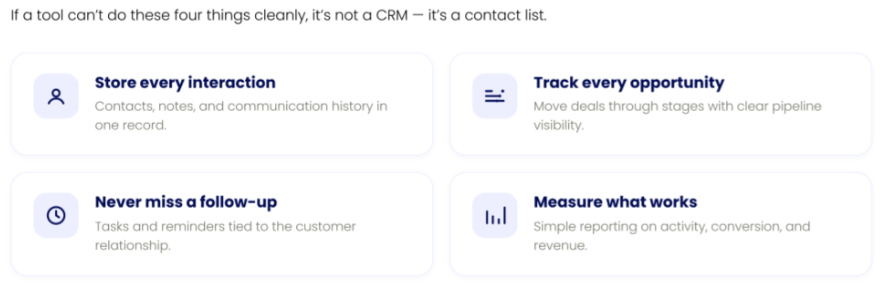
At a practical level, CRM helps you:
- Store contacts, notes, and communication history
- Track opportunities through the sales pipeline
- Manage follow-ups with tasks and reminders
- Monitor performance with simple reporting
Next, we’ll explore common CRM alternatives, assessing their strengths and potential limitations.
Zoho CRM Alternatives Compared
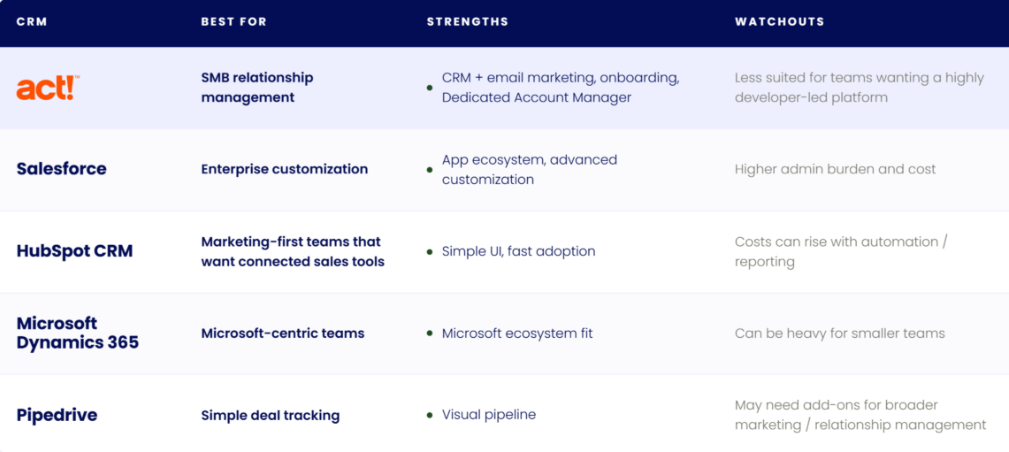
Start by defining what your CRM needs to do, then evaluate alternatives based on those priorities.
Where Act! Fits as a Zoho CRM Alternative
Act! is designed for small and midsize businesses that want a practical relationship management platform rather than a disconnected set of sales and marketing tools.
Act! helps teams:
- Manage contacts, notes, tasks, histories, and opportunities in one place
- Track sales pipeline activity and follow-up reminders
- Run email marketing and automated campaigns from connected customer data
- Support retention and repeat business through proactive customer engagement
- Get started with onboarding support and a Dedicated Account Manager
For teams comparing Zoho CRM alternatives, Act! is strongest when the goal is not just tracking deals but building long-term customer relationships.
Which CRM Features Matter Most for Small and Midsize Businesses?
Choose a CRM that captures interactions and turns them into clear next steps.
Focus on key features:
- Accessible contact history, tasks, and reminders
- Effective opportunity tracking with a straightforward sales pipeline
- Email and calendar tools that minimize manual entry
- Marketing automation to enhance follow-ups and customer retention
- Personalized onboarding and responsive support when issues arise
- Integration with essential tools in your tech stack
When Should You Consider an Alternative to Zoho CRM?
When You Need a Clearer Sales Pipeline
If your team is tracking deals in email threads or spreadsheets, a CRM is often the first “grown-up” step. Zoho CRM is commonly used to manage opportunity stages, assign tasks, and keep notes tied to each deal, so nothing gets lost. Most CRM tools should include features that help track progress through the sales funnel, allowing you to see who is moving from Lead to Opportunity to Order, which is essential for accurate forecasting.
Many SMBs choose an alternative when they want sales pipeline management plus relationship history and everyday productivity in one place, contacts, calendar, follow-ups, and reminders that keep momentum moving.
When Follow-Up and Customer Retention Matter Most
Service businesses, agencies, and account-based teams typically need more than a list of prospects. You want to remember preferences, log conversations, and set proactive check-ins that help you create customers for life.
That’s where a total relationship solution like Act! can be a better fit, especially since it integrates email campaign management, allowing teams to collaborate effectively and track what works best for customer engagement.
Example: When an SMB Might Choose Act! Over Zoho CRM
Imagine a small service business with five sales and account management users. The team is tracking leads in spreadsheets, managing follow-ups in Outlook, and sending email campaigns from a separate tool.
In this case, Act! may be a better fit than a more app-heavy CRM setup because it brings contact management, task reminders, opportunity tracking, and marketing automation into one relationship-focused workflow.
A typical workflow might look like:
- A new lead is added toAct!
- The sales rep schedules a follow-up task
- The lead is added to a segmented email campaign
- Email engagement is tied back to the contact record
- The rep moves the opportunity through the pipeline
- The customer receives ongoing retention or reactivation campaigns
When CRM and Marketing Automation Need to Work Together
Zoho is often used for basic campaigns, but many teams outgrow “one-off blasts.” Look for tools that support marketing automation like web forms, landing pages, and personalized campaigns that respond to what people click.
If you’re comparing options, sanity-check the basics:
- Can you segment contacts by real behavior and history?
- Do emails and tasks write back to the contact record automatically?
- Is there real onboarding support, like a dedicated Account Manager?
Once your use case is clear, the right CRM choice gets a lot simpler.
How Much Do Zoho CRM Alternatives Cost?
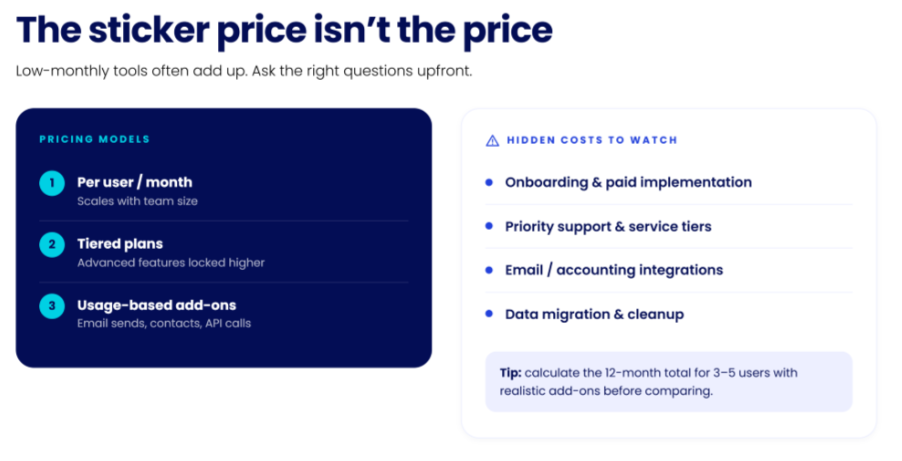
In the analysis of CRM and marketing automation alternatives, initial pricing is just the beginning. Many SMBs choose low monthly fees only to face additional charges for essential features like email sends, automations, storage, or support. While some CRMs start with low monthly pricing, total cost can increase quickly with add-ons, automation, and integrations.
To effectively assess cost-effectiveness, businesses should correlate pricing with critical tasks: tracking opportunities, managing follow-ups, and executing targeted customer communications. If a service appears affordable but fails to consolidate contact histories, tasks, and pipelines, businesses may end up incurring extra costs through supplementary tools. This fragmentation often leads to inefficiencies that outweigh the initial savings.
What Pricing Models Should You Expect?
CRM alternatives generally follow specific pricing models. While all can be effective, the best choice hinges on how your team engages with customers.
- Per user, per month: This model is simple for small teams but can escalate quickly with more users.
- Tiered plans: Advanced features, such as automated workflows or comprehensive reporting, might only be available at higher tiers.
- Usage-based add-ons: Costs can be accrued based on metrics like email volume, contacts, or API usage.
What Hidden Costs Should You Watch For?
Prior to making a decision, seek any hidden fees not outlined on pricing pages. Request a written estimate based on your contact volume and communication frequency.
- Onboarding and training (paid implementation packages)
- Support access (priority support options)
- Integrations (email/calendar sync, accounting links, web forms)
- Data migration (cleanup, field mapping, de-duplication)
How Can SMBs Compare CRM Costs More Accurately?
For a swift assessment, calculate the 12-month total for 3 to 5 users by including potential add-ons, and identify what’s absent. A CRM that keeps you organized and enhances your closing capabilities is typically the one that minimizes tool fragmentation, rather than just being the cheapest option at start. For more insights on managing your tech stack efficiently, check our guide on system costs.
Which Zoho CRM Alternatives Are Easiest to Use?
Comparing CRM alternatives, user ratings reflect real-world functionality, revealing what the experience is like after initial setup. For busy teams, knowing the system will operate smoothly is essential. A mobile CRM should be intuitive and require minimal training, as a complex interface can hinder adoption and productivity.
Reviews help reveal how a CRM performs in real-world use. It’s crucial to ensure that the CRM can adapt to your business growth, with customizable fields and scalable options.
What Do High CRM Ratings Actually Mean?
High satisfaction ratings frequently correlate with ease of use, quick onboarding, and clear reporting. While these are promising signs, it’s critical to assess their relevance to your specific workflow, including sales pipeline management, customer communications, and email outreach. For a deeper understanding of user experience, consider testing different CRM apps to evaluate their navigation intuitiveness.
Look for reviewers similar to your team (size, industry, sales model).
What Review Complaints Should You Watch For?
Lower ratings often highlight hidden costs from features limited to paid add-ons, steep learning curves, or delays in customer support when issues arise. Numerous businesses report challenges with maintaining clean data when CRM and marketing tools fail to synchronize.
As you navigate reviews, pay attention to these recurring concerns:
- “Too many clicks” needed for recording notes and tasks
- Email history is inconsistently captured
- Automation settings that are difficult to modify post-launch
- Inconsistent mobile features compared to desktop
How Should You Use Reviews to Choose a CRM?
Use reviews to form a concise evaluation plan. Request vendors illustrate user experiences, both positive and negative, and clarify what specifics are included in your subscription.
- Compile a list of 5 essential actions (log an email, schedule a follow-up, move a deal stage, send a simple campaign, generate a report).
- Execute those actions in a trial environment with your actual data.
- Assess support availability, as a CRM should enhance organization, boost sales, and foster long-term customer relationships.
Which Zoho CRM Alternatives Have the Best Integrations?
Integration capabilities often reveal major differences between CRM platforms. A CRM should connect seamlessly with your existing tools to reduce manual data entry and prevent missed follow-ups.
Start by evaluating your daily workflow, email, calendar, accounting, lead management, and reporting, and checking whether integrations are built-in, require add-ons, or rely on third-party connectors.
Which CRM Integrations Matter Most for SMB Teams?
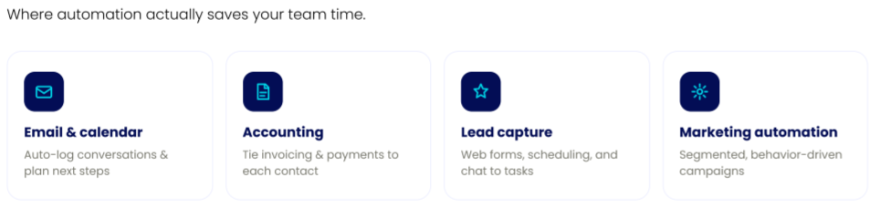
Small and midsize businesses (SMBs) usually find the greatest advantages in essential connections that minimize manual tasks while preserving customer history.
- Email and calendar: automatically log communication and plan next steps without manual inputs.
- Accounting: integrate invoicing or payment information in customer profiles for enhanced follow-up efficiency.
- Lead capture: utilize web forms, appointment scheduling, and chat functions to convert interest into actionable contacts and tasks.
- Marketing automation: manage segmented lists and execute personalized campaigns driven by user behavior.
How Act! Helps Reduce Gaps Between CRM, Email, and Marketing
Act! positions itself as a total relationship solution combining CRM with marketing automation to enhance organization and deal closure. If Outlook is central to your operations, Act! Sidebar for Outlook streamlines data entry, keeping all email interactions easily accessible.
As you refine your choices, request live demonstrations from vendors depicting real scenarios: “new web lead → follow-up task → email sent → opportunity updated.” This practical approach reveals which tools genuinely support long-term client relationships. For further insights on choosing the right CRM for your small business, explore our guide to CRM systems.
What Are the Pros and Cons of the Top Zoho CRM Alternatives?
A quick pros-and-cons check can help you focus on what matters like staying organized, following up, and keeping deals moving. Selecting the right CRM software is crucial to maximizing your productivity and ensuring you can effectively manage your customer relationships.
Act!: Pros and Cons
Pros: A strong fit for relationship-driven SMBs that want CRM plus email marketing in one place. You also get free onboarding and a Dedicated Account Manager, which many teams value when they’re switching systems or cleaning up data. Act! not only helps you plan your day but also enhances your ability to connect with prospects, ensuring you know who to call and when.
Cons: If you want a “build-everything-yourself” developer tool, you may prefer a more code-first platform. Some features can depend on your deployment (cloud vs. on premises) and add-ons.
Salesforce: Pros and Cons
Pros: Deep customization, lots of integrations, and a large app marketplace.
Cons: Many SMBs find setup, admin time, and overall cost add up quickly…especially if you don’t have an in-house specialist.
HubSpot CRM: Pros and Cons
Pros: Marketing first CRM and basic pipeline tracking.
Cons: Costs can rise as you add users, automation, and reporting depth, so it’s worth mapping needs before you commit.
Microsoft Dynamics 365: Pros and Cons
Pros: Works well for teams already living in Microsoft tools and needing advanced business processes.
Cons: Can feel heavy for smaller teams, with more configuration than you might want.
Next step: write down your top three “must-haves” (like email tracking, call lists, or automated follow-ups), then shortlist the tools that support them…and book a demo or start a free trial to confirm fit. For guidance on selecting the best CRM for your needs, check out our comprehensive guide on choosing CRM software.
TL;DR: Best Zoho CRM Alternatives at a Glance
What to remember
When managing contacts, follow-ups, and emails in multiple locations, deals can slip, and customer relationships may deteriorate quickly. A CRM consolidates customer history, tasks, and opportunity tracking, ensuring you stay organized and responsive. Effective contact management software not only keeps your information accurate but also enhances communication and personalization based on past interactions, which is crucial for maintaining strong customer relationships.
Act! enhances this by adding marketing automation, allowing for personalized email campaigns, lead capture, and ongoing nurturing…an approach that helps convert one-time buyers into lifelong customers.
Begin simply: import contacts, create call lists, and set up follow-up reminders. Once comfortable, add automated workflows and analyze results on your dashboard. For further insights, explore our guide on contact management.
Zoho CRM Alternatives: Frequently Asked Questions
What are some top-rated alternatives to Zoho CRM?
The top Zoho CRM alternatives for SMBs include Act!, Salesforce, HubSpot CRM, Microsoft Dynamics 365, and Pipedrive. Each platform serves different needs. Act! combines CRM and marketing automation, Salesforce supports complex customization, HubSpot is strong for marketing-led teams, and Pipedrive focuses on simple deal tracking.
Before choosing, shortlist 2–3 tools and test a real workflow (lead → follow-up → deal) to see what fits your team best.
How does pricing for Act! Compare to other CRM systems?
Act! is designed for SMBs that want CRM and marketing automation without paying for enterprise-level complexity or multiple add-ons.
When comparing pricing, look beyond the monthly fee and evaluate what’s included:
- Email marketing and automation
- Sales pipeline and follow-up tools
- Integrations and deployment options
- Onboarding and support
The best approach is to compare total cost based on your actual needs including users, contacts, and features, not just the entry price.
What are the key features that SMBs need from a CRM?
SMBs should prioritize features that support daily workflows and consistent follow-up, including:
- Contact and customer history tracking
- Sales pipeline visibility and opportunity tracking
- Task management and follow-up reminders
- Email marketing and automation
- Integrations with email and calendar tools.
Ease of use and onboarding support are just as important as features to ensure long-term adoption.
Why do businesses look for alternatives to Zoho CRM?
Many businesses look for Zoho CRM alternatives when they need a simpler, more intuitive system or want to reduce the complexity of managing multiple apps. Common reasons include setup challenges, fragmented workflows, and the need for stronger onboarding or support.
Teams often switch to solutions that better align with their daily workflow and combine CRM with marketing and follow-up tools in one place.
Is Zoho CRM too complex for small businesses?
Zoho CRM offers a broad set of features, but some SMBs find it requires more setup and ongoing management, especially when using multiple Zoho apps together.
For teams that prefer a more streamlined experience, a CRM that prioritizes usability, built-in functionality, and guided onboarding may be a better fit.
How do I choose the right Zoho CRM alternative for my business?
Start by identifying your core needs—contact management, pipeline tracking, follow-ups, and marketing automation. Then evaluate platforms based on ease of use, integrations, support, and total cost.
The best way to decide is to test your top options using a real workflow and choose the one that helps your team stay organized and follow up consistently.
Next Steps: Choosing the Right Zoho CRM Alternative for Your Business
If Zoho feels complex or overly “app-first,” consider a CRM that helps you stay organized while ensuring consistent follow-ups and dependable support when needed. The right tools can significantly enhance your workflow, allowing you to focus on growing your business instead of managing systems.
Make a quick shortlist
Seek a platform combining CRM and marketing automation, featuring clear opportunity tracking and straightforward email logging. A Dedicated Account Manager and complimentary onboarding can facilitate a smoother transition, as seen with Act! Advantage, which integrates CRM and marketing tools seamlessly.
Try Act! with a real use case
Start a free trial, then:
- Import your essential contacts
- Establish a streamlined sales pipeline
- Set notifications and tasks for follow-ups
- Launch one focused email campaign
Ready to take the next step? Start your free trial or book a demo to explore how Act! serves as your complete relationship management solution.