

Getting a CRM set up correctly from the start makes the difference between a tool your team uses every day and one that collects dust after the first week. The biggest barrier for most small businesses isn’t the software, it’s the time and confidence it takes to get organized, connected, and into a working routine.
This guide covers what CRM onboarding involves, why it matters for small businesses, what a well-structured onboarding session includes, and what ongoing support should look like so your CRM keeps delivering value long after the initial setup.
What Is CRM Onboarding and Why Does It Matter?
CRM onboarding is the process of getting your system configured, your data imported, your tools connected, and your team ready to use the CRM as part of their daily workflow. Done well, it turns a new software purchase into an immediate productivity gain. Done poorly, or skipped entirely, it’s one of the most common reasons CRM adoption stalls.
For small businesses without dedicated IT support, getting it right the first time, with expert guidance, is far more efficient than figuring it out alone over several weeks. A guided session also ensures that the configuration reflects how your business actually works, not just how the software works by default.
What Does CRM Onboarding Include?
A structured CRM onboarding session covers the areas that most commonly trip up new users: account configuration, data migration, tool integration, a working knowledge of key features, and ongoing support from a dedicated expert who stays with you beyond the initial session.
| What’s Included | What It Means in Practice |
| Account setup | Personal settings configured correctly from the start — time zones, preferences, and user defaults tailored to how you work |
| Data migration | Contacts and company data imported cleanly, whether migrating from a previous CRM or importing from a spreadsheet |
| Email & calendar sync | Your email and calendar connected so activity logs automatically and nothing needs to be entered twice |
| Feature walkthrough | A guided overview of key features with live Q&A — focused on what matters most to your business, not a generic product tour |
| ★ Dedicated Account Manager | A single named contact who owns your relationship — no call centers, no ticketing queues, no starting from scratch every time you reach out. Your AM knows your business model, your goals, and your history, reaches out proactively before problems arise, and is accountable for your outcomes — not just resolving individual tickets. |
Sessions are one-to-one, approximately 45 minutes, and built around your specific goals and industry. If you need additional time to get fully up and running, follow-up sessions are available, the pace is driven entirely by you.
What Makes a Good CRM Onboarding Session?
The difference between a useful onboarding session and one that wastes an hour is personalization. A generic feature walkthrough rarely translates into daily habits. A session built around your specific goals, your industry, and the workflows you actually use does.
A well-structured onboarding session should:
- Start with your goals, what you want to achieve, what’s been slipping, and what a successful first 30 days looks like
- Focus on the topics that matter most to your business rather than covering every feature in sequence
- Be tailored to your industry so examples and workflow suggestions are relevant to how you sell and serve customers
- Include live Q&A throughout so questions get answered in context, not saved for the end
What Is a Dedicated Account Manager and How Is It Different from Standard Support?
Most CRM support models put you in a queue, a ticketing system, a call center, or a help chat where you explain your situation from scratch every time. A dedicated Account Manager is a fundamentally different model: one person who knows your business, owns your relationship, and is accountable for your success.
| Standard CRM Support | Dedicated Account Manager |
| Call centers and ticketing queues | One named contact who owns your relationship |
| Start from scratch on every interaction | Your AM already knows your business, goals, and history |
| Reactive — responds when you submit a ticket | Proactive — reaches out before problems become problems |
| Generic advice based on the product | Recommendations tailored to your business model and seasonality |
| No stake in your outcome | AM success is directly tied to your business outcomes and growth |
| You escalate issues yourself | Your AM escalates internally and advocates on your behalf |
The practical difference is that you’re never starting from scratch. Your Account Manager understands your business model, your seasonal patterns, and your goals, so when they reach out or you reach out to them, the conversation picks up where it left off.
What Does a Dedicated Account Manager Actually Do?
A dedicated Account Manager isn’t a support agent, they’re a business partner focused on helping you get real value from your CRM over time. Their role covers five things:
| AM Responsibility | What This Looks Like in Practice |
| Single point of contact | One person accountable for your relationship — no re-explaining your situation, no call center routing, no ticket numbers |
| Outcome-focused guidance | Focused on whether your CRM is actually helping your business grow, not just whether the software is technically functioning |
| Proactive outreach | Reaches out before issues surface — if usage patterns suggest a workflow isn’t being used or a feature could help, your AM flags it first |
| Internal advocacy | Escalates issues, surfaces feedback, and ensures your voice reaches the right people when product or service decisions are being made |
| Business-specific advice | Recommendations informed by your industry, business model, and goals — not generic best-practice tips that apply to everyone |
Why Is One-to-One Onboarding More Effective Than Self-Service Setup?
Most CRMs offer documentation, video tutorials, and knowledge bases. These are useful references, but they can’t adapt to your specific situation, answer unexpected questions, or catch a misconfiguration before it creates data problems.
| Self-Service Setup | Guided One-to-One Onboarding | |
| Personalization | Generic — covers all features for all users | Tailored to your goals, industry, and workflow |
| Data migration | Follow documentation; troubleshoot errors yourself | Expert guides the import and catches issues in real time |
| Integration setup | Configuration steps vary; easy to miss a setting | Email and calendar connected correctly from the start |
| Time to value | Days or weeks of trial and error | Working system by the end of the session |
| Questions answered | Search documentation or wait for a support ticket response | Live Q&A throughout with a dedicated expert |
| Ongoing support | Generic support channels with no continuity | Dedicated Account Manager who knows your business |
| Follow-up sessions | Not available | Additional sessions available until you’re fully up and running |
How Do You Prepare for a CRM Onboarding Session?
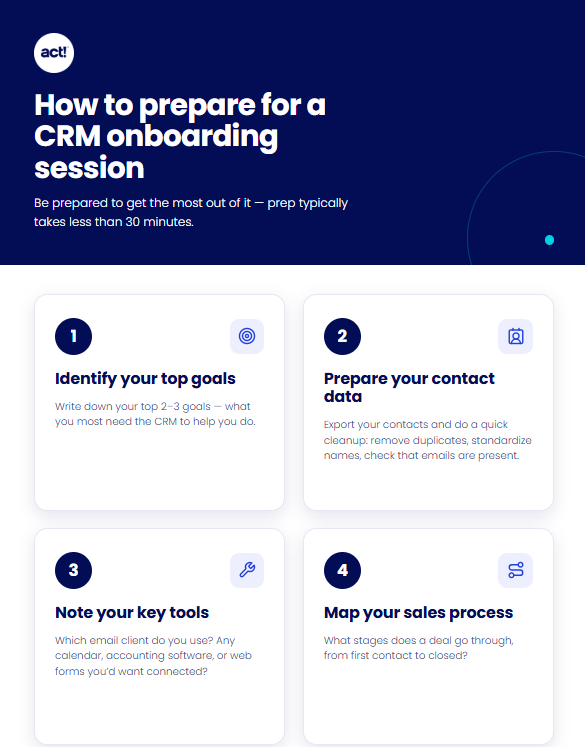
The more prepared you are before the session, the more you’ll get out of it. Most preparation takes less than 30 minutes.
Before your session
- Write down your top 2–3 goals — what do you most need the CRM to help you do?
- Prepare your contact data — export existing contacts and do a basic cleanup: remove obvious duplicates, standardize name formatting, check that emails are present
- Note your key tools — which email client do you use? Any calendar, accounting software, or web forms you’d want connected?
- Map your sales process — what stages does a deal go through from first contact to closed?
During your session
Share your goals upfront. The session is built around you — the more context your expert has at the start, the more tailored the guidance will be. Ask questions as they come up rather than saving them for the end.
How Do You Get Started?
Once you sign up, you’ll receive an email with a link to book your onboarding session. Click the link, choose a date, select a time from available slots, and your dedicated expert will take care of the rest. There’s no lengthy intake process — just pick a time and show up with your goals and your contact data ready.
If you need more time after your first session, follow-up sessions are available for as long as it takes to get fully up and running. The timeline is driven by you, not by a fixed onboarding window.
What Should You Focus on in the First 30 Days After Onboarding?
Onboarding gets you set up. The 30 days after onboarding are when habits form. Keep the focus narrow: master two or three daily workflows before adding anything else.
| Week | Focus | Daily Habit to Build |
| Week 1 | Contact management | Log every call and meeting note in the CRM the same day it happens |
| Week 2 | Follow-up and tasks | Create a follow-up task for every interaction before you close the contact record |
| Week 3 | Pipeline visibility | Update opportunity stages and next steps at the end of each day |
| Week 4 | Email outreach | Send your first campaign or templated follow-up sequence from within the CRM |
Your Account Manager will check in during this period — proactively, before issues arise. If a workflow isn’t being used as intended or a feature could help, you’ll hear from them first rather than discovering it yourself weeks later.
What Are the Most Common CRM Setup Mistakes — and How Do You Avoid Them?
| Common Mistake | What Goes Wrong | How to Avoid It |
| Importing messy contact data | Duplicates and missing emails make the CRM unreliable from day one | Clean your contact list before the onboarding session — standardize formatting and remove obvious duplicates first |
| Skipping email and calendar sync | Email threads stay disconnected from contact records, creating manual work | Connect email and calendar during onboarding so activity logs automatically from the start |
| Trying to configure everything at once | Overwhelming setup leads to partial configuration and low adoption | Start with the workflows you repeat most; add features once the basics are a daily habit |
| Not defining pipeline stages before setup | Generic stages make pipeline reports unreliable and follow-up inconsistent | Map your actual sales process before the session so configuration reflects how you really work |
| Going silent after the session | Questions accumulate, small issues become bigger ones, and adoption stalls | Use your Account Manager proactively — they’re there to help before problems surface, not just after |
Frequently Asked Questions About CRM Onboarding and Support
What is included in a CRM onboarding session?
A CRM onboarding session covers account setup and personal configuration, contact and company data migration, email and calendar integration, a guided feature walkthrough with live Q&A, and access to a dedicated Account Manager who continues supporting you after the session. Sessions are one-to-one, approximately 45 minutes, and tailored to your goals and industry.
How do I book my onboarding session?
After signing up, you’ll receive an email with a booking link. Click the link, choose a date, select an available time, and your dedicated onboarding expert will handle the rest. The process takes less than two minutes to schedule.
Can I have more than one onboarding session?
Yes. Follow-up sessions are available after your initial 45-minute session for as long as it takes to get fully up and running. The pace is driven entirely by you, there’s no fixed onboarding window.
What is a dedicated Account Manager?
A dedicated Account Manager is a single named contact who owns your relationship, not a call center agent or ticketing queue. They know your business model, your goals, and your history, so every conversation picks up where the last one left off. They reach out proactively before issues arise, escalate on your behalf when needed, and are focused on whether your CRM is actually helping your business grow.
How is a dedicated Account Manager different from standard customer support?
Standard support is reactive, you submit a ticket, explain your situation, and wait for a response. A dedicated Account Manager is proactive: they reach out before problems surface, already know your context, and are accountable for your outcomes rather than just resolving individual tickets. You never start from scratch.
Do I need to prepare anything before my onboarding session?
It helps to have your contact data exported and cleaned, your top two or three goals written down, and a basic map of your sales stages. Your onboarding expert will guide everything else, the more context you share upfront, the more tailored the session will be.
What happens if I have questions after my onboarding session?
Your dedicated Account Manager is your first point of contact for any questions after onboarding. They reach out proactively, but you can also contact them directly. If you need additional setup time, follow-up onboarding sessions are available.
Can CRM onboarding be tailored to my industry?
Yes. Sharing your industry before or at the start of your session allows your onboarding expert to tailor examples, workflow suggestions, and feature priorities to how you actually sell and serve customers. Your Account Manager also uses this context to make recommendations relevant to your business model and seasonality, not generic tips.
What Makes CRM Onboarding and Dedicated Support Worth It for Small Businesses?
The most expensive CRM mistake is the one you don’t catch until months later, a broken email sync, a messy contact import, or a pipeline that doesn’t reflect how your team actually sells. Guided onboarding prevents those problems before they compound, and a dedicated Account Manager ensures they don’t develop quietly in the months after setup.
For small businesses without in-house technical support, having one expert who configures your system correctly, one person who knows your business and checks in proactively, and the ability to book follow-up sessions whenever you need them is a meaningfully different experience from submitting support tickets and hoping for the best.
Free Onboarding Is Included with Every Act! Advantage Subscription
You’ve done the hard work of building a business that runs on relationships. Act! Advantage is built to support that, and getting started doesn’t have to slow you down. Every Act! Advantage subscription includes free one-to-one onboarding with a dedicated expert who helps you configure your system, migrate your contacts, and connect your tools so you’re up and running fast. You also get a dedicated Account Manager who stays with you long after setup, proactively checking in, answering questions, and making sure Act! keeps working the way your business needs it to. No call centers. No starting from scratch. Just one expert who knows your business and is committed to your success from day one. Ready to see what that looks like? Start your free trial of Act! Advantage today. No downloads or credit cards are required.